Candy AI video: turning generated images into clips
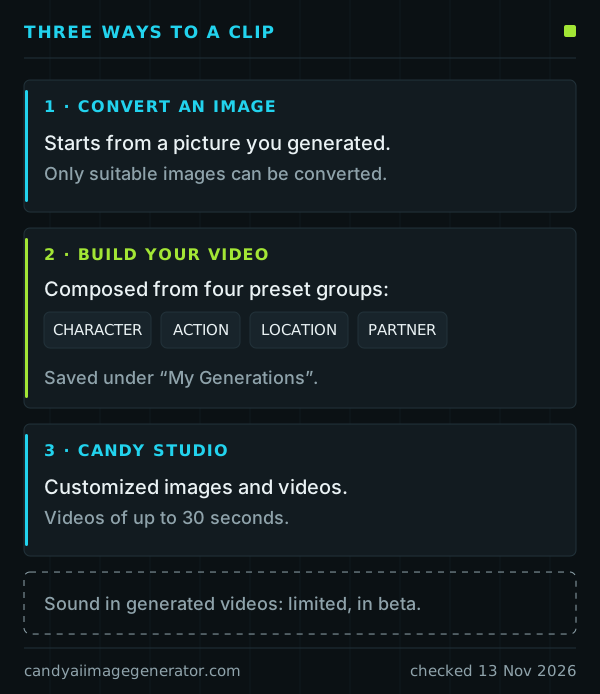
Candy AI does not make video from a blank prompt. A clip always begins with an image: you generate the picture first, and suitable images can then be converted into a short video, paid for with tokens. Two further tools, Build Your Video and Candy Studio, create clips from presets or custom settings.
Last checked:
No video from scratch: the image-first route
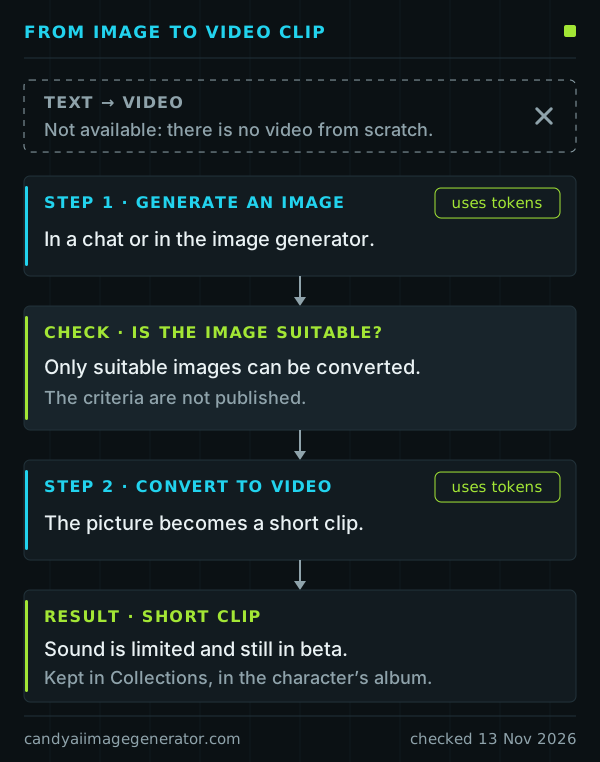
The help center is explicit: there is no direct text-to-video generation. The route has two stages.
- Generate an image, in a chat or in the image generator. This uses tokens.
- Convert it. Suitable images can be turned into short clips, and converting uses tokens as well.
Candy AI does not publish what makes an image suitable, so there is no checklist to follow: some pictures can be converted and others cannot.
Because the picture decides what the clip shows, most of the work is done before conversion. The prompt-writing guide covers that stage.
Build Your Video: four preset groups
Build Your Video composes a clip from presets. They come in four groups: Character, Action, Location and Partner. The finished clip is saved under “My Generations”.
The plan page lists video generation among the adult (18+) Premium benefits; this guide does not describe scenes. As a general caution rather than Candy AI documentation, treat any preset as a direction, not a guarantee of the exact result.
Candy Studio, the 30-second limit and sound
Candy Studio creates customized images and videos, and its videos can run for up to 30 seconds. That is the only length Candy AI documents for generated clips. Whether your account can open Candy Studio is something to confirm on Candy AI itself; plans are compared on the tokens and cost page.
Sound is the weak point. Candy AI describes sound in generated videos as limited and still in beta, so a clip may come out silent. Do not plan around audio.
Affiliate link. Adults 18+ only.
Where clips are kept and how to delete them
Clips made with Build Your Video are saved under “My Generations”. The documented way to delete a generated video is the same as for an image: open Collections, choose the character’s album, use the three-dot menu and select Delete.
The help center describes no restore option, so treat deletion as final. Clips also fall under the same personal-use rule as pictures, summarized on the usage rights page.
Troubleshooting
- There is no way to start a video from text
- By design. There is no video from scratch: generate an image first.
- An image cannot be converted
- Only suitable images can be converted, and the criteria are not published. Try a different picture.
- The clip has no sound
- Sound in generated videos is limited and still in beta.
- Tokens have run out
- Conversion is paid for with tokens. The monthly allowance arrives on the renewal date and more can be bought on the token page (candy.ai/tokens). Text chat keeps working without tokens.
- A clip cannot be found
- Build Your Video saves to “My Generations”. Other generated videos sit in Collections, in the character’s album.
- You were looking for Live Action
- That is a different feature: Premium-only interactive video scenes for selected characters, marked with a joystick icon and currently on mobile only. Candy Shorts are different again: scripted videos of under two minutes, separate from chats.
For anything tied to your own account, Candy AI’s support address is support@candymail.ai. This website cannot see accounts. More answers are on the FAQ page.
Sources
Candy AI help-center articles used on this page, read on 13 November 2026.
- Can I generate AI Videos of the AI Characters?
- What is Build Your Video?
- What is “Build Your Video”?
- What is Candy Studio?
- Why is there no sound on Candy.ai?
- How can I delete images and videos I generated?
- What can I do with tokens?
- What if I run out of tokens before the end of the month?
- What is Live Action?
- What is Candy Shorts?
Plan benefits come from Candy AI’s plan page (candy.ai/subscriptions).