Independent guide, not the generator
Candy AI image generator: how it works and what it costs
The Candy AI image generator makes pictures of AI characters in two places: inside a chat, when you ask a character to show or send you something, and in separate generator and studio tools. A free account can generate one image; after that, images are paid for with tokens, which subscribers receive every month. This website is an independent guide, so nothing is generated here: every image is created on Candy AI itself, with your own account.
Last checked:
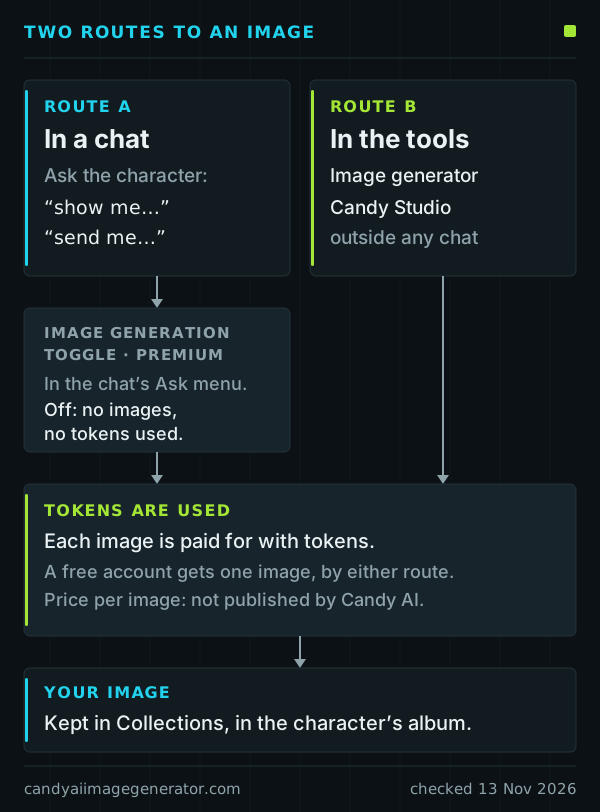
Two routes to an image
In a chat. You ask the character in ordinary language; the help center’s examples begin with “show me” or “send me”. Some characters run in a “Realistic” mode and may send photos, voice notes or videos unprompted, which toggles in the chat window turn off.
In the tools. The image generator works outside any conversation, and a free account’s single image can be made there or in chat. Candy Studio, a separate tool, creates customized images as well as videos of up to 30 seconds.
Either way, pictures are kept under Collections, in an album for each character. What you write matters on both routes: the guide to Candy AI image prompts covers the three published tips and ten worked examples.
Free account versus subscription
A free Candy AI account shows how the feature works, once. As documented on 13 November 2026, it allows five chat messages across all characters, one custom character and one generated image.
Premium lifts the message limit and adds 100 tokens a month; the plan page lists image and video generation among its benefits. Premium Plus raises the allowance to 330 tokens; its price is not published and is shown at checkout.
Plan prices and billing terms are set out on the tokens and cost page.
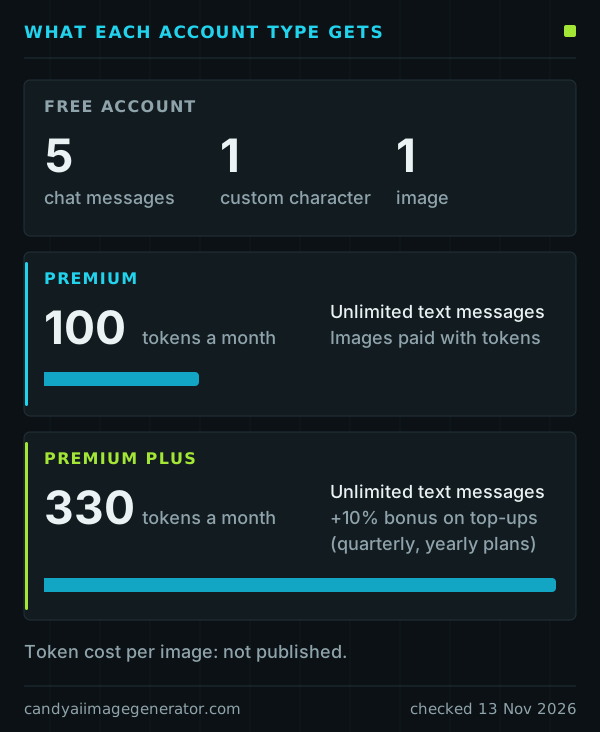
Images are paid for with tokens
Tokens are Candy AI’s internal credits. Generating an image uses them, and so does turning an image into a clip; ordinary text chat does not.
What is published is the monthly allowance and one yardstick: the referral article describes 200 tokens as a $20 value, a nominal $0.10 per token. More tokens can be bought at any time on Candy AI’s token page (candy.ai/tokens).
Affiliate link. Adults 18+ only.
The Image Generation Toggle
Because chat requests are written in everyday language, a conversation can produce a picture, and use tokens, when you only meant to talk. Premium users have a switch for this: the Image Generation Toggle in the chat’s “Ask” menu. While it is off, the character sends no images and no tokens are used.
Documented limits
- Complex prompts can fail. Very complicated requests may not produce a result.
- Consistency is not guaranteed. Exact hair color or clothing can change between images.
- No video from scratch. A clip always starts from a generated image, as the image-to-video page explains.
- Adults only. Candy AI is for adults aged 18 and over and allows adult content within its Community Guidelines.
- Personal use only. Commercial use of generated content is prohibited; see the usage rights summary.
- Not documented. Resolution, file format and generation time are not stated in the articles we read.
Deleting an image
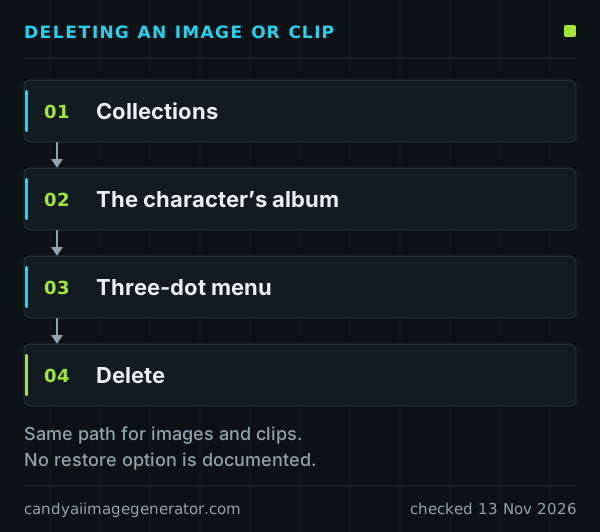
To delete a generated image or clip, open Collections, choose the character’s album, use the three-dot menu and select Delete. The help center describes no way to bring a deleted picture back, so treat deletion as final.
Cancelling a subscription is different: it removes nothing. Chats, images, characters and history stay for as long as the account exists.
Where to go next
-
Image prompts
Published tips, a six-part structure, ten examples.
-
Image to video
How a picture becomes a short clip.
-
Tokens and cost
Monthly tokens, plan prices, token value.
-
Character Studio
Designing a custom character’s look.
-
Usage rights
What you may do with generated images.
-
More questions
Phones, refunds, payment, moderation, accounts.
Common questions about the Candy AI image generator
Is the Candy AI image generator free?
Only for one picture. A free account can generate a single image, in the generator or in chat. Further images are paid for with tokens, which come with a subscription.
How many tokens does one image cost?
Candy AI does not publish a per-image price, so this guide quotes none. The published figures are the monthly allowances: 100 tokens on Premium and 330 on Premium Plus.
Can I generate images without chatting?
Yes. The image generator is separate from chat, and Candy Studio is a further tool for customized images and videos.
Why did a character send an image I did not ask for?
Requests such as “show me” or “send me” produce an image, and characters in “Realistic” mode may send media on their own. Premium users can switch chat images off with the Image Generation Toggle; toggles in the chat window stop unprompted media.
Will a character look the same in every image?
Not necessarily. Candy AI states that exact consistency of details such as hair color or clothing is not guaranteed from one image to the next.
Can Candy AI make a video straight from a text prompt?
No. There is no video generation from scratch: you generate an image first, and suitable images can then be converted into short clips.
Where are generated images kept, and how do I delete one?
Under Collections, in the album of the character concerned. To delete a picture or clip, use the three-dot menu there and choose Delete.
Is this website the Candy AI image generator?
No. This is an independent guide, not operated by Candy AI or EverAI Limited. Nothing is generated here; images are made on Candy AI itself.
Sources
Candy AI help-center articles used on this page, read on 13 November 2026.
- What can I do as a free user?
- What is Premium Plus?
- What can I do with tokens?
- How can I turn on/off image generation in chat?
- How can I get the best possible results when generating images?
- How can I delete images and videos I generated?
Plan benefits come from Candy AI’s plan page (candy.ai/subscriptions). Each deeper page lists its own sources.